
The artificial intelligence (AI) subscription market in 2026 has become one of the most saturated categories in consumer software. Nearly every major AI assistant now starts at around $20 per month for its flagship individual plan, making it challenging for users to understand which platform actually offers the best value for their needs.
ChatGPT Plus, Claude Pro, Google AI Pro, and Perplexity Pro all sit at roughly the same price point, but they differ significantly in model capabilities, included tools, usage limits, and the types of work they handle best.
The market has also become increasingly fragmented. Most providers now offer multiple subscription tiers with different limits, tools, and model access. OpenAI alone offers seven plans, ranging from a free version to a $200/month Pro tier. Anthropic offers Free, Pro, Max 5x, Max 20x, and Team plans. Google now splits its offerings between Free, Google AI Plus, and Google AI Pro.
For users trying to choose a platform, the challenge is no longer simply cost. It’s understanding which subscription actually fits the type of work they do.
What makes the market more complicated is that these platforms have started to specialize. A developer working with large codebases, a researcher analyzing hundreds of documents, a writer focused on long-form editing, and a creative professional generating multimedia content may all require very different tools.
One platform may excel at coding while another produces stronger writing or handles larger datasets more effectively. Trying to use a single platform for every workflow often leads to compromises.
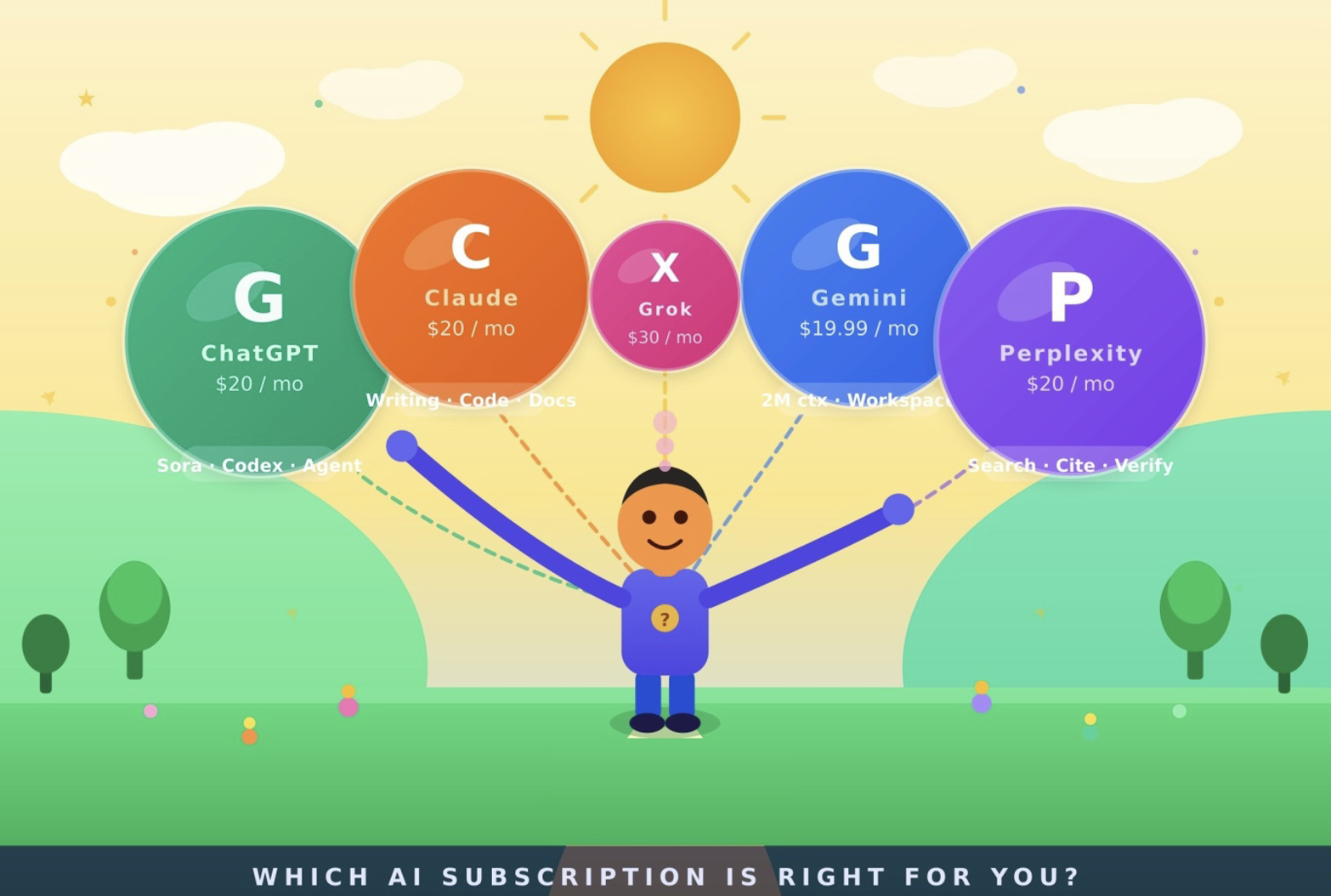
At the premium end of the market, AI subscriptions have largely split into two categories. The first consists of broad “all-in-one” AI ecosystems designed to handle as many tasks as possible inside a single platform. The second focuses on specialized productivity workflows, often relying on multiple underlying models optimized for specific tasks such as coding, research, or document analysis. These platforms reflect very different ideas about what an AI assistant should actually do.
This article examines the major AI subscription platforms available in 2026, explains what users actually receive at each pricing tier, compares them across practical use cases, and offers recommendations based on real-world workflows rather than marketing claims.
Note, the pricing, usage limits, and included features across AI platforms change frequently, so the information in this guide are approximates only and subject to change.
ChatGPT by OpenAI
ChatGPT remains the product most responsible for bringing consumer AI into the mainstream, and in 2026 it’s still one of the most feature-rich AI assistants available at the $20/month price point.
Over the past couple of years, OpenAI has expanded ChatGPT far beyond a traditional chatbot. Rather than focusing only on model quality, the company has turned the platform into a broader workspace capable of handling research, coding, image generation, voice interaction, task automation, and video generation inside a single interface.
Built on the GPT-5.4 architecture, ChatGPT stands out for the number of tools and capabilities included within a single subscription. At the same time, OpenAI’s pricing structure has become increasingly difficult to follow. The company now offers seven subscription tiers, frequent model updates, and changing feature availability that can make it unclear what users are actually paying for.
Pricing, usage limits, and included features change frequently across AI platforms, so the information in this guide reflects offerings available at the time of writing.
OpenAI currently offers five individual plans and two business-focused tiers.
Free ($0/month): The free tier includes access to GPT-5.3 with a limit of roughly 10 messages every five hours before users are moved to a lighter model variant. In early 2026, OpenAI also introduced advertisements below responses for Free and Go users in the US, making it the first major AI platform to integrate ads directly into the chat experience. For occasional use, the free version remains serviceable. For regular workflows or professional use, the message limits quickly become restrictive.
Go ($8/month): Released globally in January 2026, ChatGPT Go targets lower-cost users who want more access than the free tier without paying for Plus. The plan still includes ads and excludes many of ChatGPT’s most advanced tools, including Deep Research, Agent Mode, advanced reasoning models, and Sora video generation. As a result, the plan occupies an awkward middle ground. Users pay for a subscription while still missing many of the features that make ChatGPT useful for professional workflows.
Plus ($20/month): ChatGPT Plus remains the strongest value for most individual users. The plan includes access to GPT-5.5, Deep Research, Codex for programming workflows, Agent Mode for autonomous task execution, Sora video generation, ChatGPT Images 2.0, and advanced voice capabilities. The subscription is ad-free and includes priority access during periods of heavy demand. OpenAI has kept the price unchanged for several years even as the feature set has expanded significantly.
Pro $100 ($100/month): Introduced in April 2026, the $100 Pro tier sits between Plus and the flagship $200 plan. It primarily increases usage limits across the platform, including substantially higher Codex usage allowances during promotional rollout periods. The plan appears aimed largely at users who regularly exceed Plus limits but do not need the scale of the highest-tier offering.
Pro $200 ($200/month): The original high-end subscription tier includes GPT-5.5 Pro, a one-million-token context window, 250 Deep Research runs per month, and significantly expanded usage limits across the platform. This tier is aimed largely at developers, analysts, and researchers handling large-scale workflows or extremely large datasets. For most individual professionals, however, the $20 Plus plan remains more than sufficient.
At the moment, ChatGPT remains one of the most versatile AI subscriptions available. Research tools, coding assistance, image generation, voice interaction, task automation, and video generation all exist within a single ecosystem capable of handling a wide variety of workflows.
ChatGPT does not perform equally well across every type of workflow, despite the platform’s enormous range of features. For example, it often produces overly long responses padded with generalized filler that sounds more informative than it actually is. Compared with some competitors, the writing can still feel formulaic or repetitive, particularly in long-form documents. Another limitation is the relatively small 128K context window in the Plus tier, especially compared with Gemini’s 2-million-token context window or Claude’s 200K limit.
ChatGPT works best for generalists who want one platform capable of handling many different tasks without constantly switching tools. It’s particularly useful for marketers, product managers, creators, and professionals who benefit from having text generation, image tools, voice features, coding support, and video generation inside a single subscription. Developers who need coding assistance alongside broader multimedia capabilities may also find ChatGPT Plus difficult to beat at its price point.
Claude by Anthropic
Claude has built a distinct reputation in an increasingly crowded AI market by focusing heavily on writing quality, instruction-following, and nuanced reasoning rather than trying to offer the broadest possible feature set. While ChatGPT includes more built-in tools and multimedia features, Claude consistently ranks among the strongest platforms for long-form writing, coding accuracy, and handling complex multi-step tasks.
Anthropic has developed a particularly loyal following among engineers, researchers, technical writers, academics, and other professionals who place a high premium on precision and output quality. In many professional workflows, Claude’s responses tend to feel more natural, structured, and deliberate than competing models.
Anthropic currently offers several individual subscription tiers.
Free: Claude’s free tier expanded significantly in early 2026 with the addition of Projects and Artifacts for all users. Daily usage limits still apply, and access remains limited to the Sonnet model rather than the flagship Opus model. Even so, the free plan is generous enough for users who want to evaluate the platform or use it occasionally for lighter tasks.
Pro ($20/month): Claude Pro provides roughly five times the usage of the free tier, access to the full Claude 4.6 model family including Opus 4.6, priority access during peak usage periods, and the ability to create and share Projects. Annual billing lowers the effective monthly cost slightly. For professionals focused primarily on writing, research, coding, and document analysis, Pro remains the core offering.
Max 5x ($100/month): Claude Max 5x increases usage limits substantially and includes access to extended thinking features, Claude Code, and a 200K context window. The plan is positioned primarily for developers and researchers working with large documents, complex repositories, or coding-heavy workflows.
Max 20x ($200/month): The highest-tier Claude subscription increases usage limits even further and is aimed at power users handling large-scale research or software development workflows. Unlike some competitors, Anthropic currently does not offer annual billing discounts at this tier.
Claude performs particularly well in workflows that depend on strong writing quality, instruction accuracy, and contextual consistency. On coding benchmarks such as SWE-bench Verified, Claude’s models continue to rank among the strongest available frontier models. Anthropic has also expanded aggressively into developer tooling through Claude Code, a command-line interface that allows the model to work more directly inside local coding environments.
One of Claude’s biggest strengths is how natural the writing tends to feel. The platform generally avoids many of the repetitive phrases, rigid formatting habits, and overly polished language patterns that still appear regularly in other AI models. That has made Claude especially popular among writers, editors, consultants, researchers, and professionals producing long-form or client-facing work where tone and readability matter.
Claude’s Projects feature also adds a level of organizational structure that many competing platforms still lack. Users can build dedicated workspaces containing writing samples, coding standards, datasets, or reference documents, allowing the model to retain stronger contextual awareness across longer workflows and ongoing projects.
The platform does have some limitations. Claude does not include a built-in image generator, video generation tools, or a real-time voice mode comparable to ChatGPT. Anthropic has also avoided building a broad consumer ecosystem around the product. Claude remains focused primarily on text, reasoning, coding, and document-based workflows rather than trying to become an all-purpose multimedia platform.
Claude works best for professionals whose primary output is written, analytical, or highly structured. That includes writers, editors, lawyers, consultants, researchers, academics, technical documentation teams, and developers who prioritize reasoning quality and cleaner long-form output over multimedia features or broad integrations.
Google AI Pro
Google’s AI subscription platform has gone through several rounds of rebranding over the past few years. What was previously marketed as Gemini Advanced and Google One AI Premium now falls under the Google AI Pro umbrella following changes introduced in early 2026. While the naming has shifted repeatedly, the underlying product strategy remains largely the same: tight integration with Google’s broader ecosystem.
The platform’s biggest differentiator is its massive two-million-token context window. Gemini handles extremely large datasets more comfortably than most competing models, including long videos, large PDF libraries, extensive research collections, and large code repositories. For users working with enormous amounts of information, that context window alone can become a deciding factor.
Google currently offers several subscription tiers, including free and premium plans tied closely to Workspace and cloud storage offerings.
Free ($0/month): Google’s free tier is widely considered one of the strongest among major AI platforms. Free users in the United States now receive access to Gemini’s reasoning model once per day, along with limited access to Gemini 3.1 Pro and Deep Research capabilities within daily usage limits. This makes it particularly attractive for light users who want access to advanced frontier models without paying for a subscription.
Google AI Plus ($7.99/month): This plan includes 200 GB of storage and doubles the free-tier limits for Gemini use.
Google AI Pro ($19.99/month): Google AI Pro provides access to Gemini 3.1 Pro with a two-million-token context window, the largest context window currently available in a consumer AI subscription. The plan also includes Deep Research runs, Veo 3 video generation, YouTube Premium, and AI integration across Google Workspace applications such as Gmail, Google Docs, Sheets, Drive, and Meet.
For users already paying for 2 TB of Google One storage at $9.99/month, the difference in price to AI Pro is relatively small, which makes the upgrade easier to justify. Health Premium and Home Premium features are also bundled into the subscription at no additional cost. New capabilities for subscribers include Gemini Omni for creating and editing video from prompts and images, along with Veo-generated AI flash effects for faster editing and debugging.
Google AI Ultra ($100/month): This tier targets developers, technical leads, knowledge workers, and advanced creators. It includes substantially higher usage limits, 30 TB of cloud storage, YouTube Premium Individual, and priority access to Google’s newest AI models and tools.
The subscription also includes Gemini Spark, Google’s new 24/7 AI agent that can take actions across Google products on a user’s behalf.
Google AI Ultra ($200/month): Google briefly tested a $250/month version before reducing the price to $200 while retaining most of the same capabilities, including significantly expanded usage limits. The plan currently offers the highest limits across Google’s AI ecosystem.
Google’s main advantage remains scale and integration. No competing platform connects as deeply into an existing productivity ecosystem. For users who already rely heavily on Gmail, Docs, Drive, Meet, Android, and YouTube, Gemini often feels less like a separate AI product and more like an extension of tools they already use every day.
The enormous context window also changes the kinds of tasks Gemini handles well. Large research libraries, hours of meeting transcripts, long videos, extensive code repositories, and massive PDF collections are much easier to process in a single session than on most competing platforms. In practical use, Gemini performs especially well when users need to analyze or organize large amounts of information at once rather than work through smaller back-and-forth conversations.
Google has also become increasingly aggressive with bundled value. Workspace integrations, cloud storage, YouTube Premium, video generation, and AI editing tools all sit inside the same subscription ecosystem. For users already paying for several Google services independently, the overall pricing can become more reasonable than it initially appears.
That said, Gemini still feels less polished than some competitors in several areas. The writing quality can be inconsistent, particularly in long-form outputs where the tone sometimes shifts unexpectedly or becomes overly generic. Coding performance has improved significantly, but many developers still prefer Claude or ChatGPT for more demanding programming workflows.
The product strategy can also feel confusing. Google has repeatedly renamed its AI offerings over the past few years, and the subscription structure still lacks the clarity of some competing platforms. Features, models, and branding often change quickly, making it difficult for average users to understand exactly what is included in each plan.
Gemini is ideal for users already embedded in Google’s ecosystem, particularly researchers, analysts, students, knowledge workers, and professionals handling extremely large datasets or document collections. The platform is also attractive for users who place a high value on Workspace integration, cloud storage, and long-context analysis rather than highly polished writing or specialized coding workflows.
Perplexity Pro
Perplexity occupies a different corner of the AI market than platforms like ChatGPT or Claude. Rather than functioning primarily as a general-purpose assistant, it operates more like an AI-powered research and answer engine built around live web access.
While ChatGPT and Claude rely heavily on training data, Perplexity continuously searches the web, pulls information from multiple sources, and generates responses tied directly to cited material. The experience feels closer to an advanced research workflow than a traditional chatbot. Instead of returning a list of links like a search engine, Perplexity reads across sources, synthesizes the information, and connects claims directly to citations so users can quickly trace where information originated.
At $20/month, Perplexity Pro routes queries across multiple underlying models, including GPT-5.2, Claude Sonnet, and Gemini 3 Pro, rather than locking users into a single ecosystem. That flexibility makes it particularly useful for research, fact-checking, and monitoring rapidly changing topics.
Perplexity is not a direct replacement for ChatGPT or Claude in areas like long-form writing, coding, or content generation. Its strengths lie much more in retrieval, synthesis, and verification. Many professionals use it alongside another AI subscription rather than relying on it as a primary workspace.
The platform is especially useful for journalists, analysts, researchers, intelligence teams, consultants, and students who need current information, strong citation support, and access to live web data without manually sorting through dozens of search results.
Grok by xAI
Grok separates itself primarily through its direct integration with X and its access to real-time social and news discussions. For users who rely heavily on live information from social media, trending conversations, financial markets, or breaking events, Grok offers capabilities that most competing platforms still struggle to match.
The platform performs particularly well when tracking rapidly developing stories, online discourse, and public sentiment in real time. That has made it popular among journalists, traders, market watchers, and users focused on trend analysis or current events.
However, Grok remains less mature than competitors in areas such as long-form writing, structured research, and professional document workflows. The platform is strongest when speed, recency, and access to live conversation matter more than polished analytical output.
GitHub Copilot
GitHub Copilot serves a much narrower audience than the general-purpose AI subscriptions in this comparison. It’s built specifically for software developers who want AI assistance inside their code editor rather than a broader chatbot workspace.
At $10/month, Copilot Pro is one of the lowest-cost options for premium AI-assisted coding. The plan includes inline code completions, chat-based coding support, an AI coding agent, and access to multiple underlying models.
Copilot Pro+ costs $39/month and adds access to more advanced models, including Claude Opus 4 and OpenAI o3, directly within the IDE.
For developers, Copilot often works best as part of a two-tool setup: Copilot Pro for in-editor completions and either Claude Pro or ChatGPT Plus for broader work such as architecture planning, documentation, debugging explanations, or research. That combination costs about $30/month with Copilot Pro, or more if using Copilot Pro+.
Copilot is not trying to compete as an all-purpose AI assistant. Its value comes from being embedded directly into the coding workflow, where fast suggestions, file-aware context, and editor integration matter more than image generation, research tools, or general productivity features.
Mistral Le Chat Pro
Mistral is worth noting primarily for users concerned with privacy, pricing, or European data residency requirements. Based in Europe, Mistral positions itself as an alternative to major American AI providers while offering a lower-cost entry point into premium AI subscriptions through its Magistral model series.
The company currently offers several plans.
Free ($0/month): The free tier includes access to Mistral’s flagship models, image generation, a code interpreter, and more than 40 integrations, with a soft cap of roughly 25 messages per day.
Le Chat Pro ($14.99/month): This is one of the lowest-cost premium AI subscriptions from a major provider, undercutting ChatGPT Plus, Claude Pro, and Perplexity Pro by at least $5 per month. The plan includes a soft usage cap of around 150 messages per day.
Mistral operates entirely within Europe with servers located in Paris, making it especially attractive for European users and organizations with stricter data residency requirements. One of its more distinctive features is the absence of telemetry models. Mistral states that user data is not used to train future models, nor is it stored, logged, or reviewed to improve the system.
The platform also provides secure, privacy-focused workflows out of the box. At the same time, Mistral currently lacks several features that have become standard elsewhere, including native image generation inside the chat interface, real-time voice interaction, and a broader multimedia ecosystem.
Its strongest use cases remain text chat, coding, and document analysis. The lower price reflects that narrower scope.
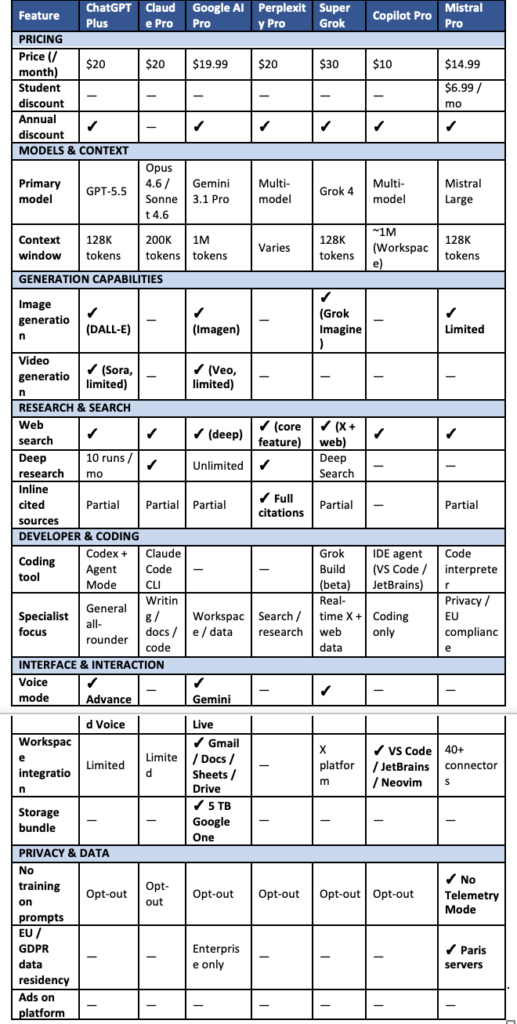
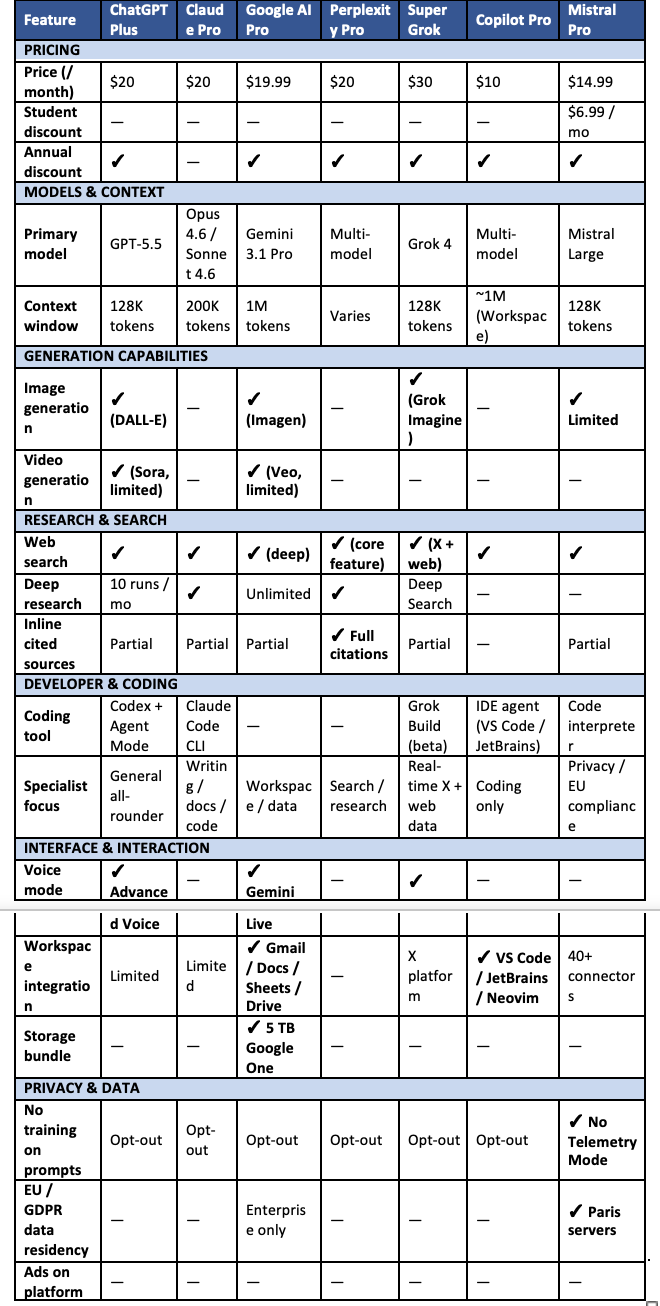
The following table compares top AI subscriptions.
 Who should choose what?
The ideal subscription depends largely on how you plan to use AI day to day.
For writers, editors, and content professionals
Claude Pro at $20/month remains one of the strongest options for writing-focused workflows. The platform consistently produces more natural, human-sounding prose than most competitors, follows detailed instructions well, and handles long documents with strong contextual consistency. Its lack of image generation and broader multimedia tools is still a limitation, but for pure writing work, Claude remains one of the strongest choices available.
Users who only need occasional image generation may find that the free tiers of other platforms cover those needs well enough alongside Claude.
For developers and engineers
GitHub Copilot Pro at $10/month paired with Claude Pro at $20/month remains one of the most cost-effective combinations for software development work. Copilot handles inline code completions and editor-based workflows, while Claude Pro provides stronger support for architecture discussions, debugging, documentation, code reviews, and large repository analysis.
ChatGPT Plus with Codex is also becoming a stronger option for developers who prefer a single subscription that includes coding support alongside image generation, research tools, and broader multimedia capabilities.
For researchers and analysts
The right choice depends heavily on the type of research being done. For synthesis-heavy work involving large document collections, Claude Pro continues to perform exceptionally well because of its strong long-form reasoning and contextual consistency.
For current events, fact-checking, and live web research, Perplexity Pro often provides a more efficient workflow thanks to its citation system and real-time search capabilities. Many researchers now treat it as a companion subscription alongside another primary AI platform.
For power users and heavy professionals
At the $100 to $200/month tier, the field narrows considerably to ChatGPT Pro, Claude Max, and Google AI Ultra.
ChatGPT Pro offers the broadest overall feature set, combining research tools, coding support, image generation, voice interaction, automation features, and video generation within a single ecosystem.
Claude Max remains especially strong for users handling large writing, coding, or analytical workloads where reasoning quality and cleaner output matter more than multimedia capabilities.
Google AI Ultra makes the strongest case for users already deeply embedded in Google’s ecosystem, particularly those working with extremely large datasets, long-context analysis, and Workspace integrations.
For Google Workspace users
Google AI Pro at $19.99/month offers some of the strongest value for users already deeply embedded in Gmail, Google Docs, Sheets, and Drive. The AI integrates directly into those tools, while the two-million-token context window supports analysis across extremely large document collections. The included 5 TB of storage can also significantly reduce the effective cost for users already paying for higher-tier Google storage plans.
For professionals whose daily workflow already revolves around Google’s ecosystem, the subscription is difficult to overlook.
For students and budget-conscious users
Before paying for any subscription, it’s worth spending time with the free tiers. Google currently offers one of the most generous free plans, including access to reasoning models, voice features, and monthly video generation credits. Claude’s free tier now includes Projects and Artifacts, while ChatGPT Free still provides access to a capable model despite the introduction of ads for U.S. users.
For many students, a well-used free tier may be enough for coursework, research, and general productivity tasks. Once usage limits begin interfering with daily work, a single $20/month subscription aligned with primary needs is usually the most practical next step.
For casual everyday users
The free tiers from Claude and Google AI are genuinely useful for lighter day-to-day use. If you consistently run into usage limits, ChatGPT Plus at $20/month still offers the widest mix of built-in tools and features, making it one of the safer choices for users who are not entirely sure what they need yet.
How reliable or unreliable are AI models?
It’s important to understand what AI models actually are, and what they’re not. They’re not search engines retrieving stored facts on demand, nor do they “understand” information the way a human expert does.
At their core, these systems are prediction engines trained on enormous amounts of text. They generate responses by calculating which word or phrase is statistically most likely to come next based on learned patterns across their training data. That process can produce remarkably convincing results, but convincing is not the same thing as accuracy.
Technical progress in 2026 has meaningfully reduced the rate of obvious factual mistakes. On straightforward factual questions, some leading frontier models now score below a 1% error rate in benchmark testing. Those numbers become far less reassuring once complexity enters the picture. Large enterprise documents, tangled legacy codebases, highly specialized legal analysis, financial interpretation, and deeply technical workflows still expose major weaknesses in reasoning and reliability.
The concern in 2026 is no longer that AI produces answers that are blatantly wrong. Most of the time, it does not. The real issue is that the mistakes are often difficult to spot. Modern AI systems are extremely good at generating responses that sound polished, precise, and authoritative, even when parts of the information are inaccurate. That creates a much more complicated kind of risk. An answer that sounds uncertain invites scrutiny. An answer written in the tone of a subject matter expert often lowers people’s guard, even when it contains factual errors.
That tension now defines how many professionals use AI tools. Across software development, research, analysis, marketing, and content creation, AI has become part of everyday workflows. At the same time, adoption has become more cautious as professionals gain firsthand experience with the technology’s limitations.
Software development offers one of the clearest examples. Estimates suggest that roughly 40% to 50% of production code written globally now involves some form of AI assistance or autonomous agent generation. Yet trust in AI-generated code has declined over the same period. Recent surveys suggest fewer than one in three engineers fully trust AI-generated output, down noticeably from just a few years ago.
The reason is experience. Development teams have learned that AI excels at repetitive boilerplate tasks such as generating API wrappers, scaffolding common patterns, and writing routine scripts at extraordinary speed. The weaknesses become much more obvious in areas involving architecture, maintainability, system boundaries, and security decisions that require deeper contextual judgment.
One consequence has been a sharp rise in what developers call “code churn,” meaning code that needs to be rewritten or patched shortly after deployment because teams accepted AI-generated output too quickly without sufficient review.
Research and analysis present a similar challenge. Models with massive context windows can process thousands of pages of material in seconds, fundamentally changing document review and synthesis workflows. At the same time, those systems still occasionally fabricate statistics, confuse structural details, or produce summaries that sound convincing while subtly misrepresenting the underlying source material.
Research from Stanford has shown that even specialized legal and financial AI systems continue to generate citation hallucinations, including perfectly formatted references to academic papers or legal cases that do not actually exist. AI is extremely effective at organizing, sorting, and surfacing information, but factual claims still need to be verified against primary sources before they can be trusted professionally.
The limitations are often even more visible in content creation. The internet in 2026 is saturated with AI-generated writing that is formulaic, optimized for search, technically competent, and immediately recognizable to experienced readers. Audiences have developed a strong sensitivity to the cadence and phrasing patterns associated with unedited AI copy, even if they cannot always explain exactly why something feels hollow or artificial.
When asked to generate an article or blog post from scratch, AI models reliably produce content that covers the expected talking points while stripping away much of what makes writing memorable or meaningful. Facts are not always reliable. Perspective is simulated rather than lived. Anecdotes often feel interchangeable. Emotional resonance is limited because emotional experience itself does not exist within the model.
Where AI genuinely adds value in creative work is earlier in the process. It can help test headline ideas, organize scattered notes into a workable structure, generate multiple framing angles, or accelerate early drafting. Those are real productivity gains. Treating AI as the final author of polished creative work, especially material tied directly to a brand, publication, or professional reputation, often produces exactly the kind of generic content audiences have already learned to ignore.
The multi-subscription trap
One trend that deserves more attention is how quickly professionals accumulate multiple AI subscriptions. Since each platform has its own strengths, it becomes very easy to justify adding “just one more” tool. A content marketer might use ChatGPT for brainstorming, Claude for long-form writing, and Gemini for research inside Google Docs. A developer might rely on Copilot for in-editor coding, Claude for architecture decisions, and Perplexity for documentation or live research.
That approach is not necessarily unreasonable, but it should be deliberate.
The problem is that AI subscriptions can quietly stack up faster than people realize. It’s surprisingly easy to reach $80 to $100 per month in overlapping tools without clearly defining why each one is necessary. Before subscribing to another platform, it’s worth asking a simple question: “Am I genuinely using this differently from the tools I already pay for?”
For many professionals, the most practical strategy is choosing one primary platform for day-to-day work, then using free tiers or limited plans from competing services for occasional secondary tasks. In practice, that often delivers most of the benefit of a multi-platform workflow without the cost and redundancy of maintaining several full subscriptions at once.
Important cautions
If you’re paying for a professional AI subscription, the mindset needs to shift from “user” to “editor” or “auditor.” It’s better to treat AI as an extremely fast but inconsistent junior assistant. The practical division of labor many experienced professionals now follow is something close to a “70/30 rule.” Let AI handle the early, volume-heavy portions of the work: generating ideas, building outlines, pulling together background material, summarizing documents, or producing an initial draft. Those are tasks where speed matters more than perfection and where errors are usually easy to catch.
The problems start when people move too quickly from AI output to finished deliverable.
If AI produces code, legal analysis, research summaries, citations, financial interpretation, or published writing, every important claim still needs human review. The technology has improved dramatically, but it remains prone to subtle mistakes, fabricated citations, incorrect assumptions, and confident-sounding inaccuracies that may not be obvious at first glance.
One of the most important habits professionals can develop is treating AI output as a starting point rather than a final authority.
That is especially true for citations and factual sourcing. AI systems still routinely generate references that look completely legitimate, including journal articles, URLs, court cases, studies, and author names that do not actually exist. Even when a citation is real, the model may misrepresent what the source actually says. Every important reference still needs to be checked manually against the original material.
For professionals integrating AI into serious workflows, a “zero-trust” approach is increasingly becoming standard practice.
- Never publish, submit, deploy, or distribute AI-generated work without human review. Whether it’s code, research, legal analysis, marketing copy, or written content, AI output should be treated as a draft or working layer, not a finished deliverable.
- Never trust citations at face value. Verify that sources exist, confirm that links are real, and check that the referenced material genuinely supports the claim being made.
- Be careful with confidential or sensitive information. Many AI systems retain prompts, interactions, or uploaded documents for training, logging, or product improvement unless specific privacy protections are enabled. Companies handling legal documents, proprietary code, financial information, healthcare records, or client data need to understand exactly how each platform handles retention, storage, and model training policies before integrating AI into internal workflows.
- Understand the limits of “reasoning” models. Even advanced reasoning systems are still prediction engines underneath. They can produce sophisticated chains of logic that sound internally coherent while quietly building conclusions on incorrect assumptions. Longer answers and more detailed explanations do not necessarily mean the reasoning is more reliable.
- Watch for overreliance. One of the subtler risks with AI tools is cognitive offloading. As systems become more capable, users can gradually stop questioning outputs, verifying details, or deeply engaging with the material themselves. Over time, that can weaken critical thinking and domain expertise rather than strengthen it.
- Treat speed as the feature, not authority. AI’s greatest strength is acceleration. It can compress hours of organization, drafting, synthesis, or exploration into minutes. That speed is genuinely valuable. The mistake is assuming speed also guarantees correctness, judgment, or expertise.
Despite the risks, AI is unlikely to disappear from professional workflows. The productivity gains are simply too large in many industries. The more realistic future is one where professionals become better at understanding where AI excels, where it struggles, and how to build review processes around it.
The professionals getting the most value from AI in 2026 are typically not the people blindly trusting it, nor the people refusing to use it entirely. They’re the people treating it as a powerful but imperfect tool that still requires supervision and discertion.
Conclusion
There’s no single “best” AI subscription in 2026. The market has matured to the point where the major platforms now specialize in different strengths, and the right choice depends heavily on how you actually work.
For most people, the risk of choosing the “wrong” platform is lower than it seems. The standard $20/month pricing tier across the industry makes it relatively easy to experiment without a major financial commitment. It’s usually smarter to start with the platform that best matches your primary workflow, then upgrade only when usage limits or missing features start creating real friction.
It’s also worth resisting the urge to accumulate subscriptions too quickly. AI tools overlap far more than companies would like to admit, and it becomes surprisingly easy to spend $80 to $100 per month on services solving many of the same problems. In most cases, one primary platform paired with a few strategically used free tiers is more than enough.
At the same time, AI still needs to be approached with caution. The technology is fast, useful, and increasingly capable, but it’s not consistently reliable. These systems can produce polished, confident output while quietly introducing factual mistakes, flawed reasoning, or fabricated information that may not be immediately obvious.
The professionals getting the most value from AI are usually not the people blindly trusting it, nor the people refusing to use it entirely. They’re the people treating it like an extremely fast but imperfect assistant, one that still requires oversight, verification, judgment, and experience.